

Shared Nodes vs Dedicated Nodes: Which Do You Need?

GETBLOCK
April 13, 2026
6 min read
Choosing the right node isn't something you want to rush. It depends on a few key factors: your RPC provider, the complexity of your dApp, and the expected user traffic.
If you're using an RPC provider like GetBlock, you'll typically have two options: shared nodes and dedicated nodes. Most providers offer both, and picking the right one can save you thousands of dollars or prevent costly downtime when it matters most.
In this post, you will learn about shared and dedicated nodes, their differences, and how to choose the right one for yourself.
What's a Shared Node?
A shared node is exactly what it sounds like. You're sharing the node's resources with other developers. Multiple users send requests to the same infrastructure, and the provider manages everything behind the scenes. It's the most common (and affordable) way to get started with an RPC provider.
How it works behind the scenes
When you create an endpoint on a shared plan, your requests are routed to a pool with those from other users. The provider's infrastructure serves everyone and handles load balancing. During normal traffic, this works seamlessly. But during peak periods, e.g., a hyped NFT mint or a market crash, you're competing for the same resources as everyone else.
Think of it like an apartment building. You've got your own unit (your access token and endpoint), but you share the hallways, elevator, and water supply with other tenants. Most days, everything runs fine. But when everyone comes home at 6 PM and wants to shower? The water pressure drops.
Who it's best for:
Developers in the building/testing phase
Side projects and MVPs
Apps with low to moderate traffic
Teams are watching their budget while validating an idea
What's a Dedicated Node?
A dedicated node is infrastructure reserved exclusively for you: no sharing, no noisy neighbors, no competing for resources. The node sits there waiting for your requests and yours alone.
How it works behind the scenes
With a dedicated node, you get guaranteed compute power, memory, and bandwidth. Your performance doesn't depend on what other developers are doing. Whether it's a quiet Tuesday or a chaotic market day, your latency stays consistent, and your rate limits are yours to max out.
This is a private house. You own the whole property. The water pressure is always strong because nobody else is using it. You can renovate however you want. And if something breaks, you're not waiting behind 50 other tenants to get it fixed.
Who it's best for:
Production apps with real users (and real expectations)
High-frequency applications, e.g., trading bots, arbitrage systems, DEX aggregators
Latency-sensitive use cases where milliseconds matter
Teams that need predictable performance and can't afford downtime
Apps where your users are paying customers
Shared vs. Dedicated: The Real Differences
Shared Nodes | Dedicated Nodes | |
Server | Shared with other users | Private server, just for you |
Requests | Metered (CU-based) | Unlimited |
Rate limit | 20–500 RPS (plan-dependent) | No limit (hardware-dependent) |
Latency | ~10ms average | ~4ms average |
Uptime SLA | 99% | 99.9%+ |
Price | $0–499/month | From $1,000/month |
Setup | Instant (2 minutes) | Hours (provisioned by team) |
Configuration | Standard | Custom (client, settings, location) |
Best for | Development, moderate traffic | High-traffic, mission-critical |
When to Use a Shared Node
Shared nodes are the right choice when:
You're developing, prototyping, or in early production.
Your traffic is predictable and within plan limits.
You need access to multiple chains (shared supports 100+).
Cost efficiency is a priority.
Your application can tolerate occasional rate limiting.
Example workloads for shared nodes:
Wallet showing balances and transaction history
dApp with < 10,000 daily active users
Blockchain analytics dashboard with periodic queries
Smart contract development and testing
Side projects and personal tools
GetBlock shared node plans:
Plan | CU/month | RPS |
Free | 50K/day | 20 |
Starter | 50M | 100 |
Advanced | 220M | 300 |
Pro | 600M | 500 |
Enterprise | Custom | Custom |
Ready to access blockchain data with flexible pricing? Sign up for GetBlock and start building with our RPC endpoints today.
When to Use a Dedicated Node
Switch to dedicated when:
You're hitting rate limits regularly (HTTP 429 errors).
You need consistent sub-10ms latency.
Your application handles real money at scale (e.g., exchanges, large DeFi protocols).
You need unlimited requests without CU tracking.
You require a custom node configuration.
Uptime is mission-critical (99.9%+ SLA needed).
You need private mempool access (BSC) or Yellowstone gRPC (Solana).
Example workloads for dedicated nodes:
Crypto exchange backend
High-frequency trading bot
DEX aggregator with high query volume
Large-scale blockchain indexer
Payment processing system
NFT marketplace with millions of users
Dedicated Node Features on GetBlock
Performance Tiers
High Performance | Standard | |
Hardware | Maximum allocation | Balanced |
Throughput | Highest | High |
SLA | 99.9% | 99.5% |
Best for | HFT, exchanges, mission-critical | Most production dApps |
Pricing
Full Node: from $1,000/month
Archive Node: from $1,500/month
Subscription periods: 1, 3, 6, 9, or 12 months
Up to 20% discount for annual terms
Some chains (Solana, Arbitrum, NEAR) have custom pricing
Configuration Options
Choose server location (Europe, USA, Asia)
Full or Archive mode
Custom client parameters
Choose performance tier (High or Standard)
Decision Framework
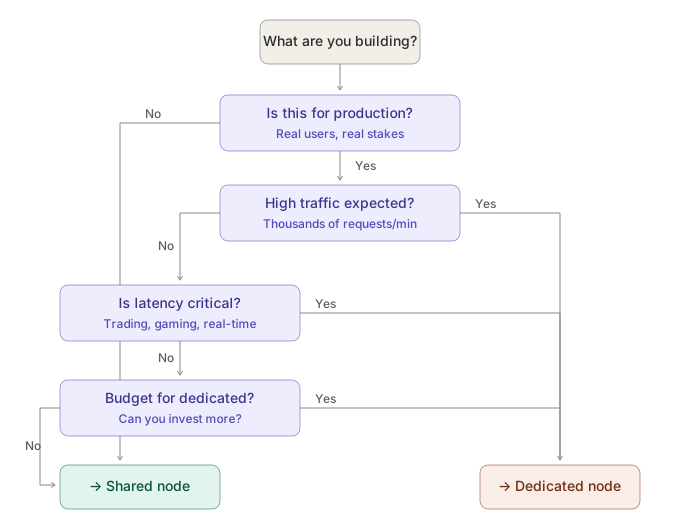
Ask yourself these questions:
Am I hitting rate limits? If yes, consider dedicated
Do I need > 500 RPS? Dedicated (shared maxes at 500 RPS on Pro)
Is sub-5ms latency critical? Dedicated (~4ms vs ~10ms shared)
Can I afford $1,000+/month? If not, optimize shared usage first
Do I need a private mempool or gRPC? Only on dedicated
Do I need multi-chain? Shared is more cost-effective for many chains
Ready to access blockchain data with flexible pricing? Sign up for GetBlock and start building with our RPC endpoints today.
What About Starting Shared and Upgrading Later?
Here's the thing: You don't have to make a permanent decision on day one.
Starting with a shared node and upgrading to dedicated later is a flexible strategy. It allows your team to be resourceful and adapt as your app grows, helping you feel in control of your infrastructure choices without unnecessary commitments.
Signs you've outgrown your shared node
Keep an eye out for these signals:
Latency spikes during peak hours: If your response times are solid at 3 AM but crawl at noon, you're feeling the "noisy neighbor" effect.
You're hitting rate limits regularly: The occasional 429 error is normal. Hitting it every day? That's a pattern.
Users are complaining: Slow transaction confirmations, failed requests and timeouts. These translate directly into lost trust (and lost users).
Your traffic is growing predictably: If you're seeing consistent month-over-month growth, don't wait for things to break. Plan.
You're building something people pay for: The moment real money is on the line, whether it's a DeFi protocol, a trading bot, or a paid API, predictability matters more than saving a few dollars.
How easy is the migration?
With most providers (including GetBlock), switching from shared to dedicated is straightforward:
You spin up a dedicated endpoint
You swap the URL in your config
That's it, or you can use the hybrid approach(combining both shared and dedicated nodes) as seen below
1
2
3
4
5
6
7
8
// Primary: Dedicated node (low latency, unlimited)
const primary = new JsonRpcProvider("https://go.getblock.io/DEDICATED_TOKEN/");
// Fallback: Shared node (backup if dedicated has issues)
const fallback = new JsonRpcProvider("https://go.getblock.io/SHARED_TOKEN/");
const provider = new FallbackProvider([
   { provider: primary, priority: 1 },
   { provider: fallback, priority: 2 },
]);
This gives you dedicated performance with shared backup at minimal additional cost.
Not sure yet? Start with shared (it's free) and upgrade when you need more. Create your free account


Popular Posts

June 9, 2021
4 min read

November 9, 2021
5 min read

March 18, 2021
4 min read

May 16, 2022
5 min read


